
How to Automatically Turn Your Notes into Flashcards with AI
How to Automatically Turn Your Notes into Flashcards with AI
We know the struggle - Creating flashcards takes time.
Every student has been there: A towering set of empty flashcards sitting before you and you know before this tower is not gone, I won't be done. Creating flashcards is a tedious task and takes a lot of time.
But once created, flashcards are one of the best study tools out there. Via spaced repetition and active recall they help you to retain knowledge into long term memory. Which in turn means you can recall all the necessary information in your exams and beyond.
Key insight: Spaced repetition & active recall make flashcards one of the most effective study tools.
Today I am going to show you how you can automatically turn notes into flashcards with the help of AI. So you can skip the daunting step of creating, save a lot of time and focus on actual learning.
Let's jump into flashcard creation right away.
Methods to Automatically Convert Notes to Flashcards
There are multiple tools and methods to turn your notes into flashcards. You can manually prompt LLMs like ChatGPT or Claude to get flashcards or use specialized Study AIs like Knowunity. Since there is not the one method, it is a good idea to try out multiple methods to then find out which one suits you best.
In general all tools work in a similar fashion:
-
Upload your notes to the respective tool. If you don't have specific notes but a list of topics, that's fine as well.
-
Extract relevant information - Use the tool to extract all relevant topics and information from your notes. Tools like Knowunity do this step automatically, with LLMs you manually have to prompt this step. I will show you working prompts in the next section.
-
Generate flashcards - Let the tool automatically create your flashcard contents. When using a tool like ChatGPT you still need to transfer the output onto your flashcards. With Knowunity you can start learning right away.
-
Here comes the fun part: Learn & repeat.
With the method outlined above you can significantly cut the time spent on your flashcard creation and instead focus on actual revision.
Let's go through this method in some more detail.
Flashcard Creation with ChatGPT
As an example for flashcard creation with an LLM I will go with ChatGPT.
Before we upload any of our notes to the tool, let's start with the prompt:
I want to create study flashcards from my notes. Please read the text below and create concise, effective flashcards to help me review the material.

Each flashcard should have:

- A question on the front that tests understanding (not just recall).

- A short, clear answer on the back.

- If helpful, include examples or context in the answer (but keep it brief).

- Use simple, natural language.

Format the output as a numbered list of flashcards like this:

Front: [Question]

Back: [Answer]

Here are my notes:
The prompt example above tells the LLM what your goal is and ensures that the model always returns its answer in the wished flashcard format. You can simply copy & paste the prompt above or adjust it further to your needs.
Let's open ChatGPT. First add your documents to the context:
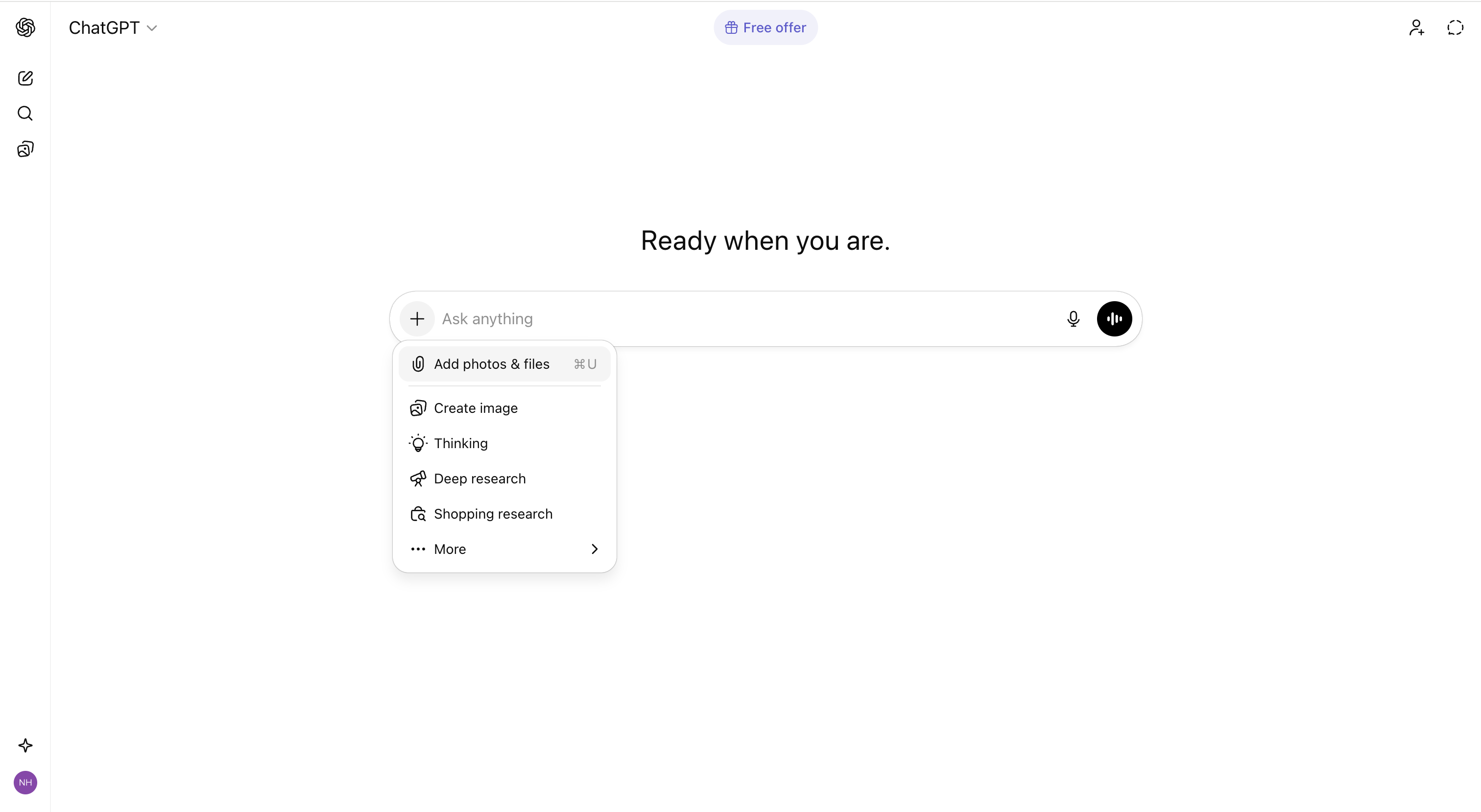
Then add your prompt to the LLM and you are ready to go:
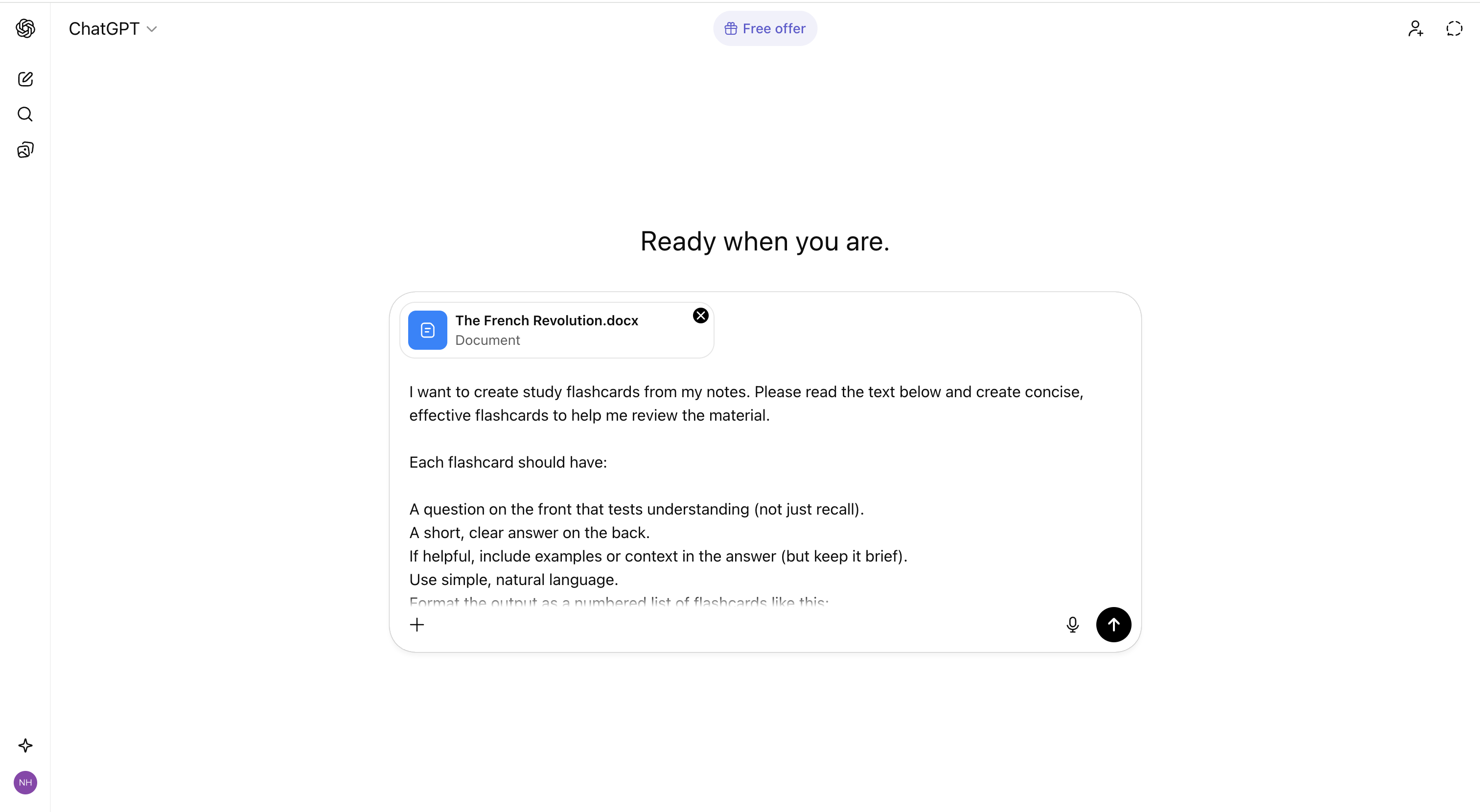
ChatGPT will return you a bunch of flashcards similar to the example below:
1️⃣

Front: Why was the social structure of France a major cause of the Revolution?

Back: Because the Third Estate (97% of the population) paid most taxes but had little political power, fueling anger at inequality.

2️⃣

Front: How did France's financial crisis push the country toward revolution?

Back: War debt and royal spending bankrupted the state; attempts to tax the rich were blocked, convincing people the system was unjust.

3️⃣

Front: What role did Enlightenment ideas play in starting the French Revolution?

Back: Thinkers challenged absolute monarchy and promoted rights and popular sovereignty, giving people a framework to demand change.
You can now transfer this to your physical flashcards or into any other flashcard tool you are using.
That is how it's done—very easy and only takes a few minutes.
Flashcard Creation & Repetition with Knowunity
Creating flashcards becomes even easier on the Knowunity App.
First download Knowunity via the App Store or Google Play Store; alternatively you can also use the web version. Little hint though—the app works even smoother.
In the App go to the home tab and select the Flashcard Tool. Upload your documents via the plus icon and simply prompt the tool to create flashcards. In this case you can skip the lengthy prompt since the system will automatically return well-formatted flashcards.
Here's how the process looks:
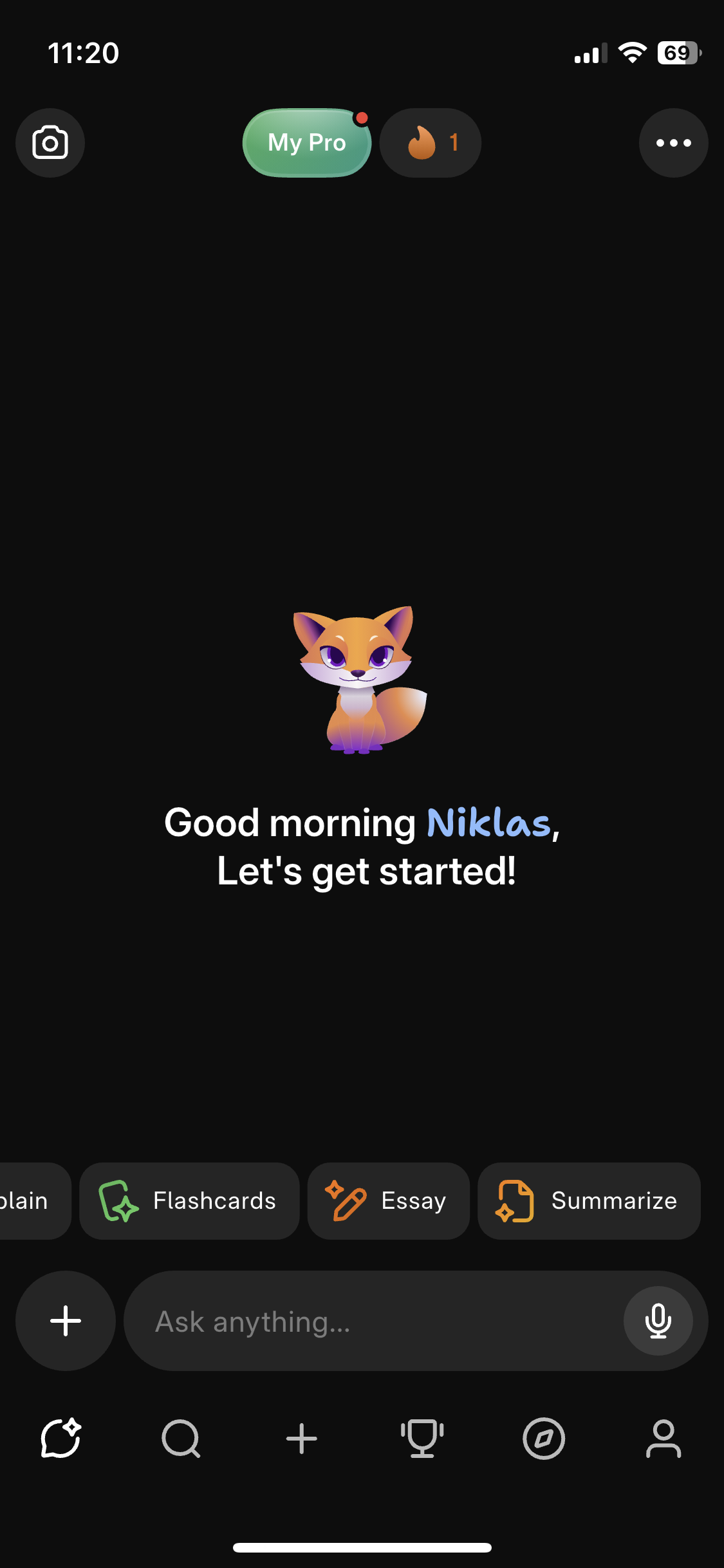
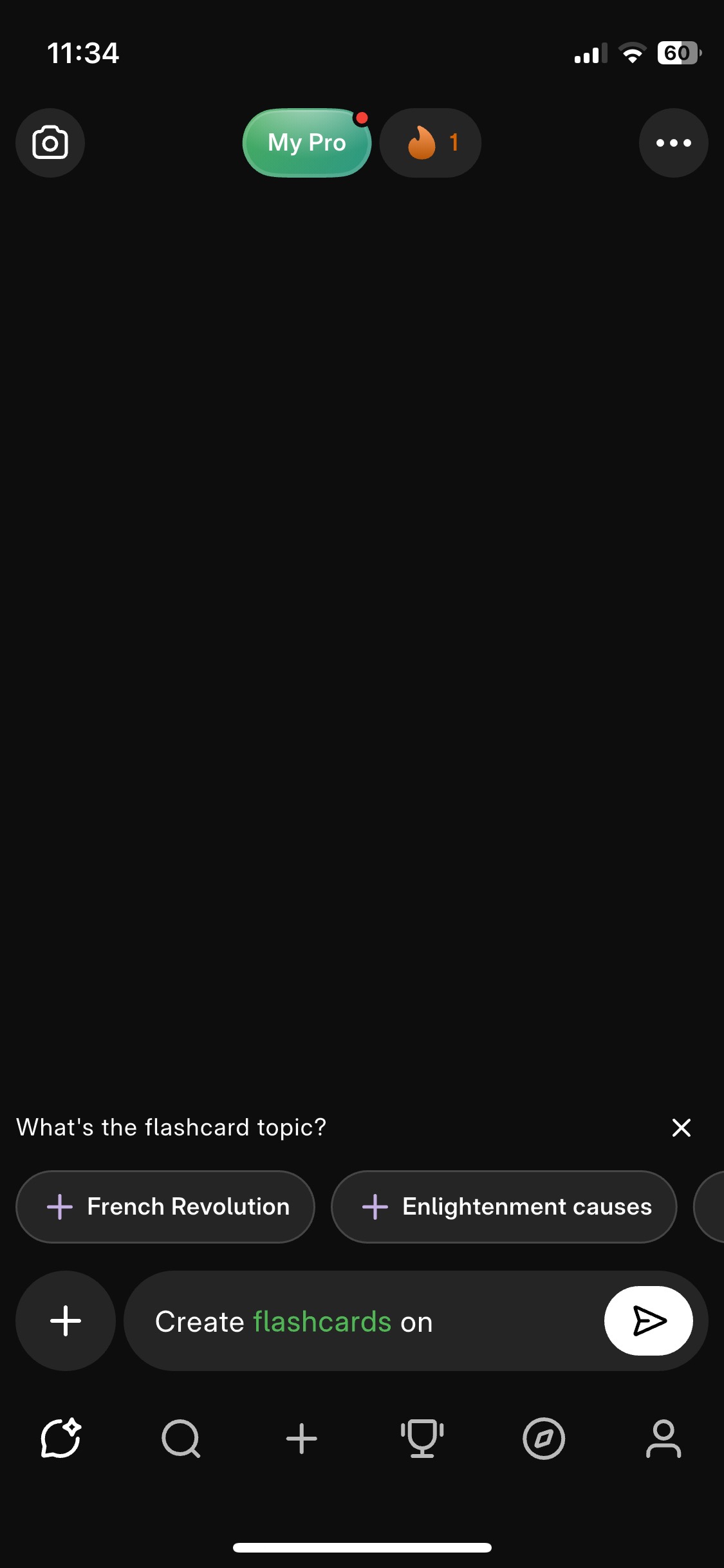
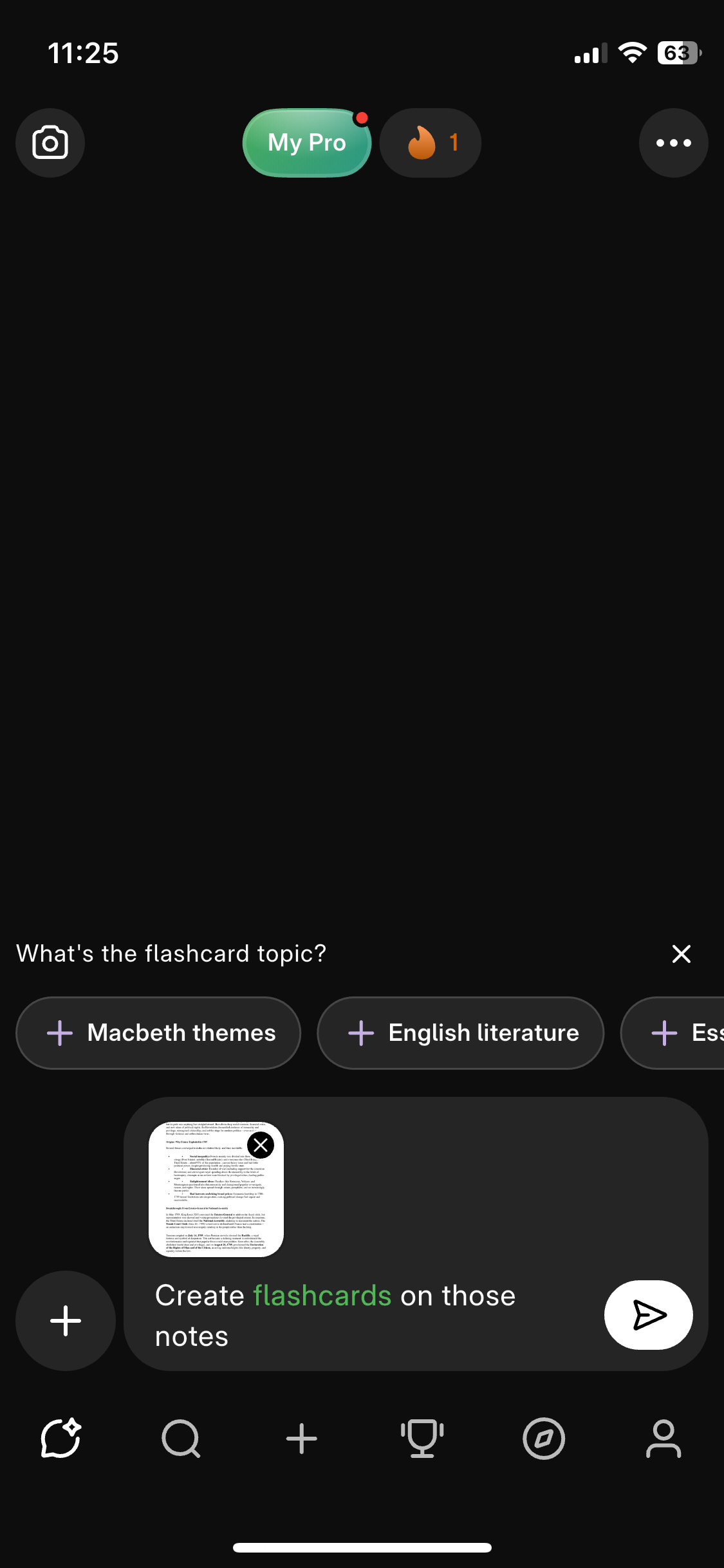
After you upload your notes, the app will automatically create usable flashcards right away. The neat thing is you can immediately start revising within the app.
Now you are ready to go and can start revising, within minutes thanks to the Knowunity AI.
Before you go off creating & learning with flashcards, below are some final Dos & Don'ts for proper AI flashcard creation.
Dos & Don'ts
Dos
-
Write good notes: The better your initial notes or list of topics are, the better will the flashcards be. The LLMs rely on your input to create high quality flashcards. So it's best you give them high quality input.
-
Sanity check the flashcards: Briefly go over the flashcards and eyeball if they are well formatted and correct before you jump into revision. You can do this by briefly going over the flashcards before learning.
-
Ask for more: In case not all topics are covered by the created flashcards, simply ask the system to cover the missing topics as well. You can repeat the creation process as often as you want until everything is covered.
-
Get into a habit: You now saved the time of flashcard creation. The next step is trying to find a habit to regularly repeat and revise the flashcards.
Don'ts
-
Don't over-rely on the AI or LLM: Even though LLM capabilities and accuracy are amazing, you should not over-rely on the AI. If you think information on the flashcards is wrong or missing, check your original notes.
-
Don't upload poor notes: If you upload notes which are not structured at all, the model might get confused and return bad flashcards. Try to upload notes that are structured and as complete as possible.
Conclusion
Learning with flashcards is one of the most effective methods to retain information through spaced repetition and active recall. These techniques help move knowledge from short-term to long-term memory, making it easier to recall when you need it most.
By using LLMs and AI tools as described above, flashcard creation also becomes one of the easiest and most convenient study methods available. You can skip the time-consuming setup and jump straight into learning.
Try it out and you'll discover how much more efficient, and enjoyable, studying with flashcards can be.
Start Creating AI-Powered Flashcards
Transform your study notes into effective flashcards instantly with Knowunity's AI. Save hours of manual work and start learning smarter today.
About the Author
Niklas Heist
Product Manager at Knowunity. Passionate about making learning more accessible through AI.
Related Articles

How to Use AI to Write Summaries
Learn how to use AI to create effective summaries for your study material. Transform long chapters and notes into clear, focused overviews in seconds.

The 10 Best Prompts for School
Master AI for schoolwork with these 10 ready-to-use prompts. Learn how to write effective prompts that get you exactly what you need for homework, studying, and test prep.
Best ChatGPT Alternatives for School
ChatGPT is great, but it's not your only option. Discover the best AI tools for high school students, from research and writing to homework help and studying.
Want to learn smarter?
Explore more articles, tutorials, and best practices to help you study with AI.
Browse All Articles